Matthias Carstens, RME 的联合创始人,也是 RME 论坛中非常活跃,作为产品与用户中最值得信任的中间人,在 7 月 19 日发布了一篇帖子:关于 Totalmix 1.96 beta 版的发布。他表示,为了让大家在即将到来的暑假不会被堆起来的阳光沙滩鸡尾酒喂得太无聊,技术部门决定将 Totalmix 升级到 1.96 beta 6 给大家来个原地爆炸。我觉得,RME 这个品牌,可能真的不是为了维护这个品牌的名誉而不断发布更新,而是因为,他们真的是一群技术顽童。。。在之前发布了 Room EQ 技术后,他们可能是找到了新大陆,开始疯狂地给这个技能加经验。但不管如何,这样的团队,就是用户的幸事。原文地址
Summer holidays are near. Preventing you to get bored with all the sun, cocktails and beaches, here comes a heavily loaded new version of TotalMix FX – v 1.96 beta 6. It comes with updated TotalMix FX Remote v 1.42. Some comments on the below list:
暑期将至。为了让大家不要对阳光沙滩鸡尾酒感到无聊,我们推出了点满技能的 TotalMix FX v1.96 beta 6。一同推出的还有 TotalMix FX Remote(遥控版) v1.42。
– Thanks to forum users ASauer for reporting Talkback and OSC issues, and forum user maggie33 for testing OSC changes and feedback. And everyone else reporting issues and posting wishes for TM FX. The below list is full of user-driven improvements, so keep it coming!
感谢论坛用户 ASauer 报告 Talkback 和 OSC 的问题,及用户 maggie33 对 OSC 更新的测试及反馈。及即时通报 TM FX 问题并希望其不断强化的各位们。以下列表完全是在用户的驱动力下进行的诸多改善,大家再接再厉!
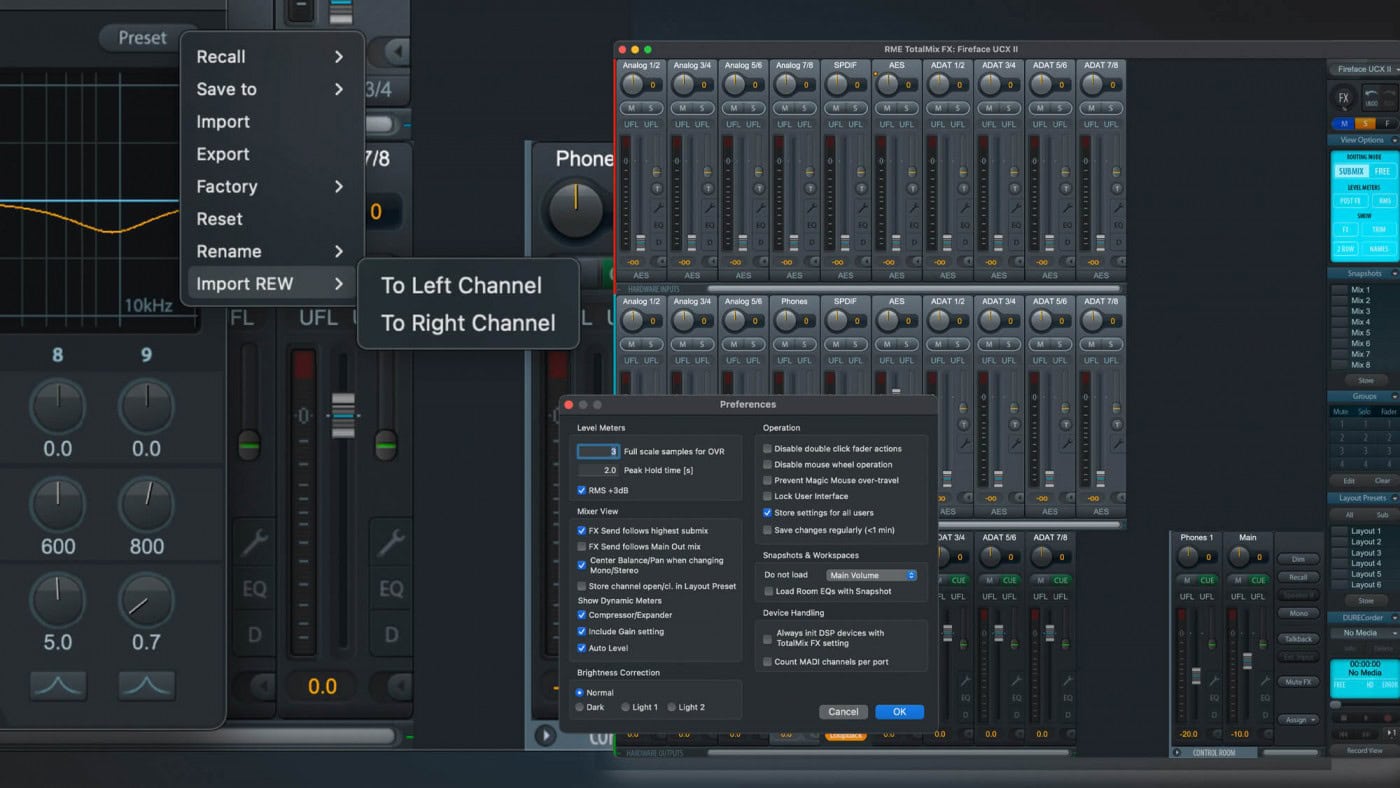
– The collaboration with Sound ID/Sonarworks already hit the press. Version 1.96 includes support for the free alternative REW (Room EQ Wizard). Exporting the EQ files as ‘formatted text’ makes them compatible for import into TM FX Room EQ. You’ll find an entry ‘Import REW –> To left channel / To right channel’ at the bottom of the Preset dialog. Using REW is not as streamlined as SoundID, though. You need to set the EQ parameters for export manually:
–;与 Sound ID/Sonarworks 的合作已经登上了新闻。1.96 版包含了新增的 REW(Room EQ Wizard 向导)。将 EQ 文件导出为”;格式化的文本”;可使它们在导入 TM FX Room EQ 时具备兼容性。在预置对话框中的下方你可以找到”Import REW 导入 REW ->;到左通道/到右通道”;的选项。不过,REW 并不如 SoundID 那般精简罢了。你需要手动设置 EQ 参数以便导出:
Choose Configurable PEQ, 9 filters, current sample rate
选择可调式参数 EQ, 9 个滤波器,及当前采样率
Frequency range 20-20 kHz step 1 Hz
频率范围 20Hz~20kHz,步进 1Hz
Gain range +20 -20 dB step 0.1 dB
增益范围 +20 -20dB 步进 0.1 dB
Q/BW format half gain
Q 值/频宽格式 半个增益
Q/BW range 0.4 to 9.9 step 0.1
Q 值/频宽范围 0.4 ~9.9 步进 0.1
If any of these are set wrong TotalMix not only issues an error message during import, but also tries to tell more detailed what is wrong.
以上参数如果设置错误,TotalMix 不仅会在导入时显示错误信息,还会提示是哪里出了错误。
– There is a small addition to the remote functionality: enabling the new option Follow Submix in the Remote Preferences, the remote’s submix selection will follow any change performed on the TotalMix FX host.
–;遥控功能有小的附加功能:在遥控优先项中新增可选的新项 跟随从混音,之后遥控版的从混音将跟从 TotalMix FX 主机中的从混音设置。
– The OSC table has been updated extensively, and a new template is provided to showcase the operation and commands. The table also includes detailed explanations on differences between old and new OSC support (page Comments). Download see below.
– OSC 表大幅更新,并添加一个新的模板以展示操作与指令。该表还包含了对新旧 OSC 支持的解释。下载见下方。
New in TotalMix FX 1.96 beta 4:
TotalMix FX 1.96 beta 4 新功能
TM FX General 通用功能
– Old Digiface/Multiface/RPM: loading Snapshots/Workspaces could be incomplete
老款 Digiface 等设备:载入快照/工作区可能会不完整
– Several fixes for Talkback function: update Trim state, correct Gain settings, Fader operation
Talkback 多项修正:更新对准状态,修正增益设置,推子操作
– Ext. In Gain setting (horizontal fader) did not work in UFX+, UFX II, UFX III
外部输入的增益设定 (横向推子) 在 UFX+, UFX II, UFX III 中失效
– Reworked Preferences window for better overview, operation, and space for even more options (see below)
重制的优先项窗口可获得更好的全览,操作,及更多选项的空间 (见如下)

– New option Load Room EQs with Snapshot
新选项 载入快照及其包含的 Room EQ
– New option Save changes regularly (within 1 minute) – saves mixer states during operation, slightly delayed
新选项 定期保存修改 (1 分钟内) –;在操作中保存混音器状态,并稍微延迟。
– Show active Loopback mode in respective Input channel (small LED symbol)
在启用了环回模式的输入轨道上显示黄色 LED 小点 (这个很有意义,可以一眼看到启用了 LB 的轨道,我测试了,如下图)

– PEQ: any frequency value between 20Hz and 20000Hz can now be entered for EQ (no conversion to increments as with adjustment by mouse)
参数 EQ: 20Hz 到 20kHz 中的任何频率可以手动输入 (而不像鼠标调节那样不可控)

– New mismatch messages with improved text and TotalMix/Device buttons instead of Yes/No
新的改善的不匹配信息文本与 TotalMix/设备按钮替代了原本的是/否
– When removing the device the last mismatch message (Mac) or all (Windows) are exit automatically
当移除设备时 Mac 中最后的不匹配信息或 Win 中的所有不匹配信息会自动关闭
– Improved TotalReset: also displays all subwindows (Control Room, Sidebar)
改进的全部重置:包含了所有下属窗口 (控制室,侧边条) 的显示
– Show device names in ARC USB dialog box header and mixer settings windows, Channel Layout (only for more than one device, the latter not for Mac)
在 ARC USB 设置窗口条,混音器设定窗口条,通道铺陈窗口条均显示当前设备名称 (仅用于同时使用多设备时,在 Mac 中通道铺陈窗口条不显示设备名称)
– ARC USB: new option Room EQ On/Off for Main Out
ARC USB:新增选项 在主输出上启闭 Room EQ
– TM FX now signals the last selected submix to the network remote (for new option Follow Submix in TM FX Remote)
TM FX 现可跟随网络遥控所选择的从混音 (须在选项中启用 跟随遥控段从混音)
– Added support for HDSPe AoX card, extending TM FX to 256 channels
增加对 HDSPe AoX 卡的支持,从而将 TM FX 通道数扩展到 256 个
OSC
– OSC crash fixed (no descriptor found)
OSC 崩溃修正
– Cue via OSC restricted: does not allow switching to Main Out and Speaker B anymore
通过 OSC 进行 Cue 限制:不再允许切换到主输出和 B 输出
– OSC scaling now switchable to correct maximum value for Gain, EQ band type, Room EQ Scale, Expander Threshold,
OSC 幅度可切换以对齐增益,EQ 频段类型,Room EQ 幅度,扩展器预置的最大数值
– Conversion of page 4 for Room EQ (old page 4 invalid, not functional anymore)
页面 4 转换为 Room EQ(旧的页面 4 无效,不再有任何功能)
– Sending of 0 for non-existent elements
为不存在的元素持续输出 0
– Increase crash safety for unexpected data
为不可预知的数据提高防崩溃安全性
– Settings, OSC Tab: Added compatibility mode option to disable newer OSC functions of TM FX 1.96.
设定中 OSC 标签:添加兼容模式,以禁用来自于 1.96 的新功能
Remote 遥控
– New option Follow Submix. Requires TM FX 1.96 or higher as network server.
新选项 跟随从混音。需要 TM FX 版本为 1.96 或更高作为网络服务器
Mac only, TM FX and Remote 仅限 Mac, TM FX 及遥控端
– Save Workspace writes to Recent list; no stationary flag set
将工作区写进近期列表;而非固定的标记
– Magic Mouse optimization (option to disable tracking)
苹果鼠标优化 (禁用轨迹选项)
– Improved limitation handling of max number of character inputs (27)
改进了最大字节数的输入限制 (27)
Download 下载
Windows
TM FX: https://www.rme-audio.de/downloads/tmfx_win_196b6.zip
TM FX Remote 1.42b3: https://www.rme-audio.de/downloads/tmfx … _142b3.zip
Mac
TM FX: https://www.rme-audio.de/downloads/tmfx_mac_196b6.zip
TM FX Remote 1.42b3: https://www.rme-audio.de/downloads/tmfx … _142b3.zip
New OSC table and TouchOSC template:
TM FX: https://www.rme-audio.de/downloads/osc_ … ix_new.zip
(the former one is still available as osc_table_totalmix_old.zip)
Changes in beta 5 are explained in post #28 https://forum.rme-audio.de/viewtopic.ph … 80#p221780
Changes in beta 6 are explained in post #35 https://forum.rme-audio.de/viewtopic.ph … 59#p221859
Installation 安装
Windows: Exit TotalMix FX (right click systray icon) and copy the new version into Windows\System32, overwriting the old file.
Win 中安装:先退出系统托盘中的 TotalMix FX,然后将压缩包中的执行文件拖入 Windows\System32,并覆盖旧文件。
Mac: Exit TotalMix FX completely and copy the app into the Applications folder, overwriting the old file.
Mac 中安装:完全退出 TotalMix FX,并拷贝 app 到应用文件夹中,覆盖旧文件。
Have fun and enjoy the holidays!
尽情体验,享受假期吧!